1 - 在esxi上运行iperf3
准备软件
在esxi6.7上准备iperf
ssh 登录 esxi 6.7, 然后执行以下命令:
mkdir /temp
cd /temp
wget http://vibsdepot.v-front.de/depot/bundles/iperf-2.0.5-1-offline_bundle.zip
esxcli software vib install -d /temp/iperf-2.0.5-1-offline_bundle.zip  --no-sig-check
结果输出为:
Installation Result
   Message: Operation finished successfully.
   Reboot Required: false
   VIBs Installed: DAST_bootbank_iperf_2.0.5-1
   VIBs Removed:
   VIBs Skipped:
清理并进入目录:
rm -rf /temp
cd /opt/iperf/bin
cp iperf iperf.copy
准备网络
查看目前 esxi 的网络情况:
esxcli network ip interface ipv4 get
如果只有一个网卡(兼管理网络),输出类似:
Name  IPv4 Address  IPv4 Netmask   IPv4 Broadcast  Address Type  Gateway      DHCP DNS
----  ------------  -------------  --------------  ------------  -----------  --------
vmk0  192.168.0.58  255.255.255.0  192.168.0.255   STATIC        192.168.0.1     false
另外测试之前关闭esxi的防火墙:
esxcli network firewall set --enabled false
为了测试 hp544+ 网卡(连接为56G)在 esxi 下的性能,需要在 esxi 中取消直通,然后设置相关的网络
- virtual switches 中添加 virtual switch, 如 “vSwitch-56G”, uplink 选择 hp544+ 网卡
- port group 中添加新的 port group,如 “56G Network”,virtual switch 选择 “vSwitch-56G”
- vmkernel NICs 中添加新的 VMkernel NIC,port group, 选择 “56G Network”
再次查看网络:
esxcli network ip interface ipv4 get
可以看到新加的 56g 网络的 IP 地址:
Name  IPv4 Address    IPv4 Netmask   IPv4 Broadcast   Address Type  Gateway      DHCP DNS
----  --------------  -------------  ---------------  ------------  -----------  --------
vmk0  192.168.0.28    255.255.255.0  192.168.0.255    STATIC        192.168.0.1     false
vmk1  192.168.100.28  255.255.255.0  192.168.100.255  STATIC        0.0.0.0         false
测试
作为服务器端启动:
/opt/iperf/bin/iperf.copy -s -B 192.168.100.28
作为客户端
作为客户端执行:
/opt/iperf/bin/iperf.copy -c 192.168.100.1 -t 10 -P 10
-t 表示测试的总时间长度,-P 启动多线程进行并发测试,一般 8-10 比较合适。
或者增加参数, -i 表示每隔多长时间打印一次测试结果,避免长时间等待(默认需要等测试时间 -t 结束才显示结果), -f g 表示用 Gbits 来显示带宽:
/opt/iperf/bin/iperf.copy -c 192.168.100.1 -t 10 -i 2 -f g -P 10
测试结果
场景1
-
服务器端是直通 + ubuntu server:之前测试 56g eth 模式下测速打开 48G
-
客户端为 esxi 6.7, 自带驱动,不直通,不开启
-
测试带宽为: 32G左右
-
cpu使用率有点高,大概20%-30%
结果:和正常的48G相比,只有 2/3 的性能,估计是 rdma 没有开启的原因。
esxcli software vib list | grep mlx
net-mlx4-core                  1.9.7.0-1vmw.670.0.0.8169922          VMW      VMwareCertified     2023-03-19
net-mlx4-en                    1.9.7.0-1vmw.670.0.0.8169922          VMW      VMwareCertified     2023-03-19
nmlx4-core                     3.17.13.1-1vmw.670.2.48.13006603      VMW      VMwareCertified     2023-03-19
nmlx4-en                       3.17.13.1-1vmw.670.2.48.13006603      VMW      VMwareCertified     2023-03-19
nmlx4-rdma                     3.17.13.1-1vmw.670.2.48.13006603      VMW      VMwareCertified     2023-03-19
nmlx5-core                     4.17.13.1-1vmw.670.3.73.14320388      VMW      VMwareCertified     2023-03-19
nmlx5-rdma                     4.17.13.1-1vmw.670.2.48.13006603      VMW      VMwareCertified     2023-03-19
参考
2 - 在esxi上运行iperf3
准备软件
在esxi7上准备iperf3
esxi 7 自带 iperf3,位于 /usr/lib/vmware/vsan/bin/iperf3,使用时注意先执行以下命令:
cp /usr/lib/vmware/vsan/bin/iperf3 /usr/lib/vmware/vsan/bin/iperf3.copy
复制一份作为服务器端使用,否则直接通过 iperf3 运行服务器端,会报错:
/usr/lib/vmware/vsan/bin/iperf3 -s -B 192.168.0.40
iperf3: error - unable to start listener for connections: Operation not permitted
iperf3: exiting
关于这一点请参考:
另外测试之前关闭esxi的防火墙:
esxcli network firewall set --enabled false
在windows10上准备iperf3
从 iperf 官方网站上下载 iperf3:
iPerf - Download iPerf3 and original iPerf pre-compiled binaries
准备网络
网络连接概述
两台机器之间一共有三组网络连接:
- 千兆网络:esxi主机和开发机器之间通过千兆交换机连接,都是千兆有线网卡, ip地址设置为 192.168.0.10 和 192.168.0.40
- 五千兆高速网络:esxi主机上插一块 aqn-108 五千兆网卡(支持windows、linux和exsi),开发机器主板自带一块 aqn-111c 五千兆网卡(支持windows、linux,不支持黑苹果),通过网线直连,ip地址设置为 10.0.0.10 和 10.0.0.40
- 40G超高速网络:esxi主机上插一块 hp 544+ 40G网卡(支持windows、linux,exsi不确定),开发机器同样插一块 hp 544+ 40G网卡(支持windows、linux,黑苹果不确定),通过40G QSFP网线直连,ip地址设置为 192.168.1.10 和 192.168.1.40
esxi网络设置
5G网络设置
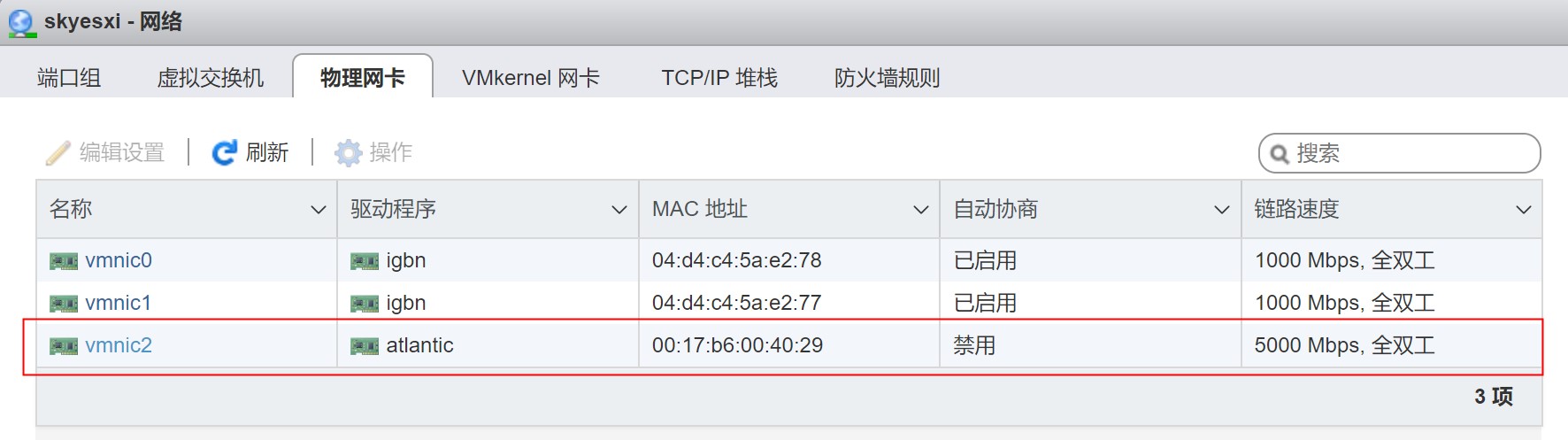
首先确保5G物理网卡已经识别,链路速度为5000Mbps,全双工。
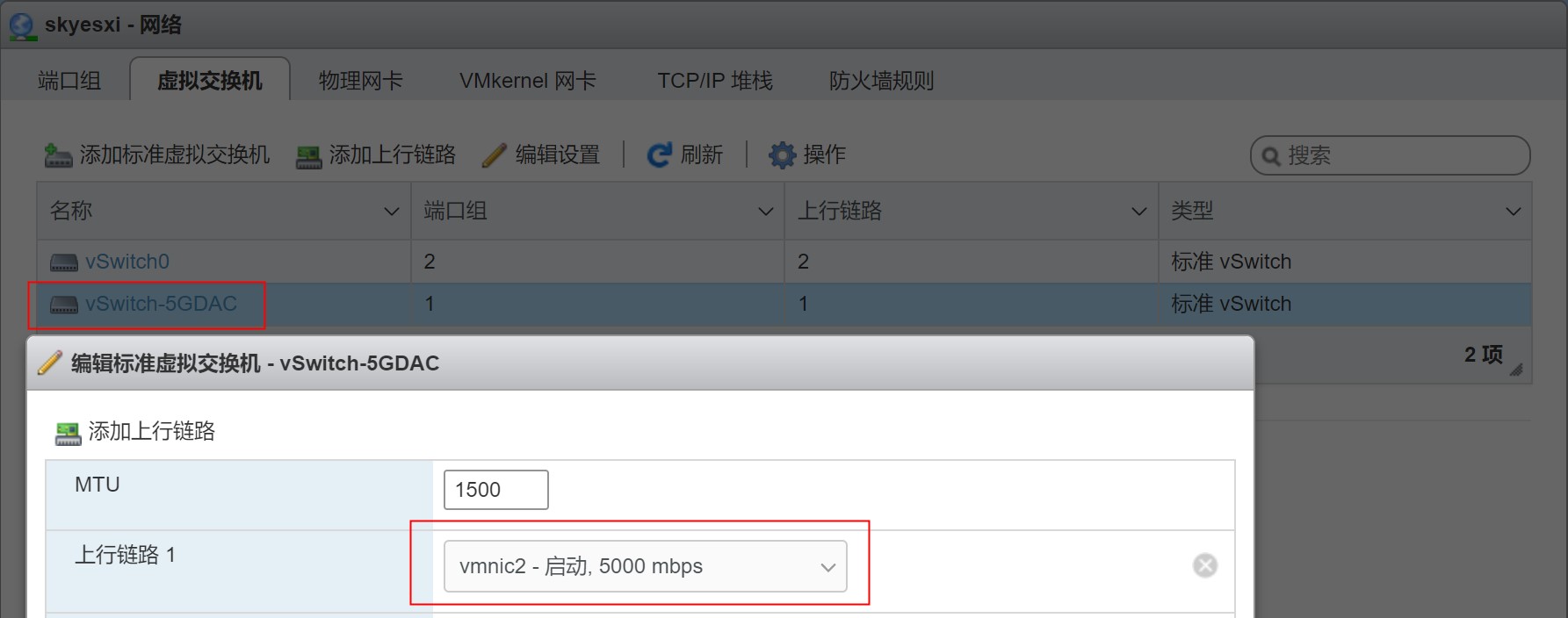
开始创建5g网络的虚拟交换机,上行链路选择上面的5g网卡:
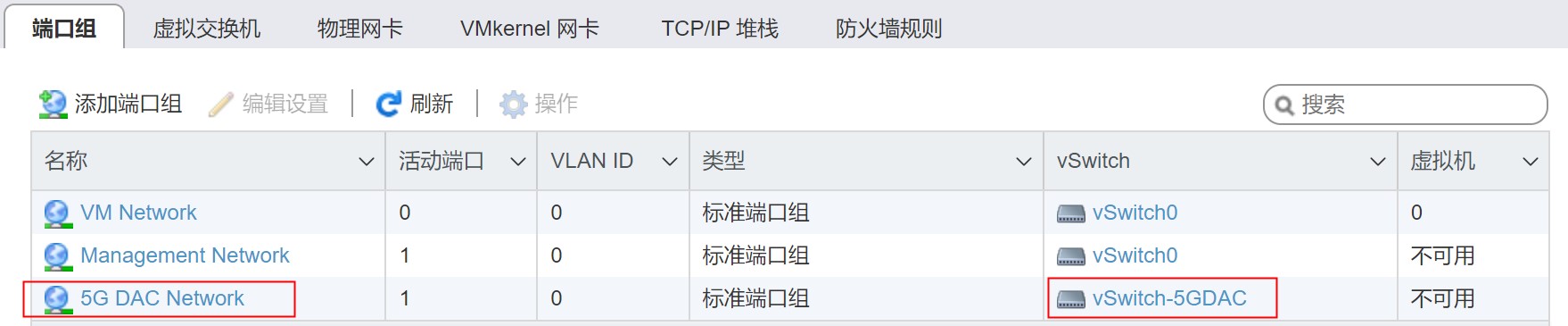
再添加5g的端口组,虚拟交换机选择前面创建的5g交换机:
最后在vmkernel网卡中添加一个vmkernel网卡:
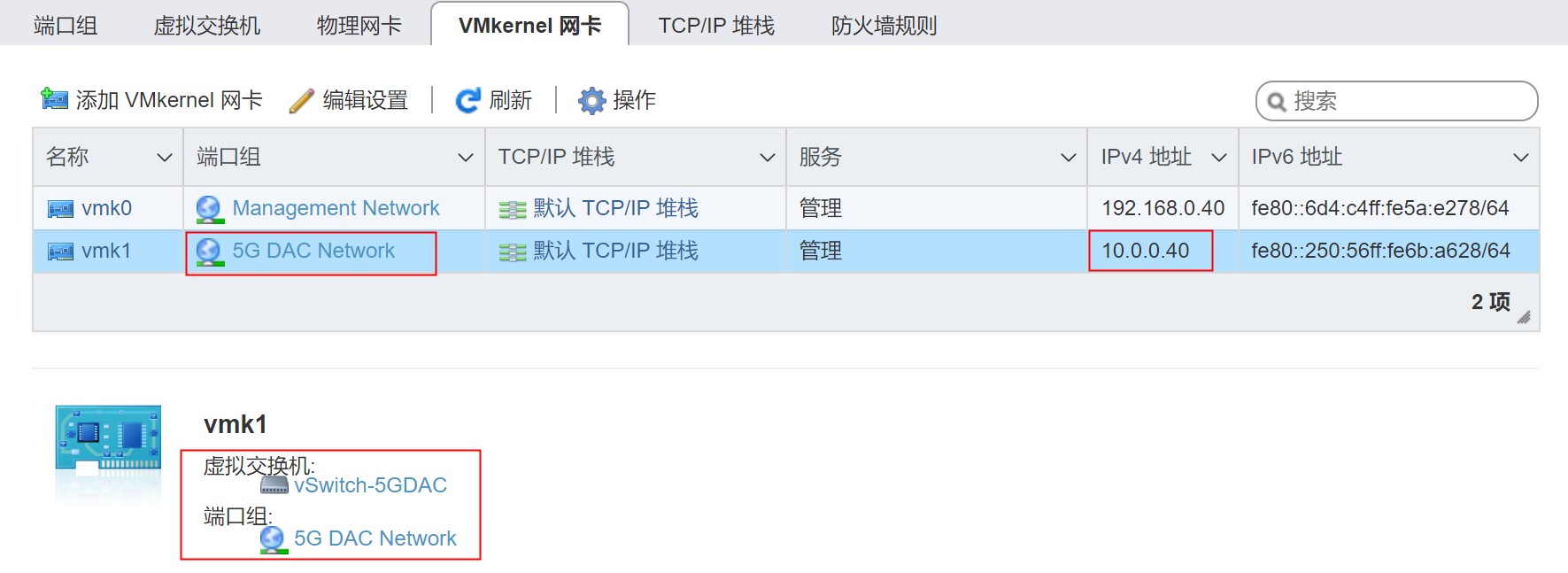
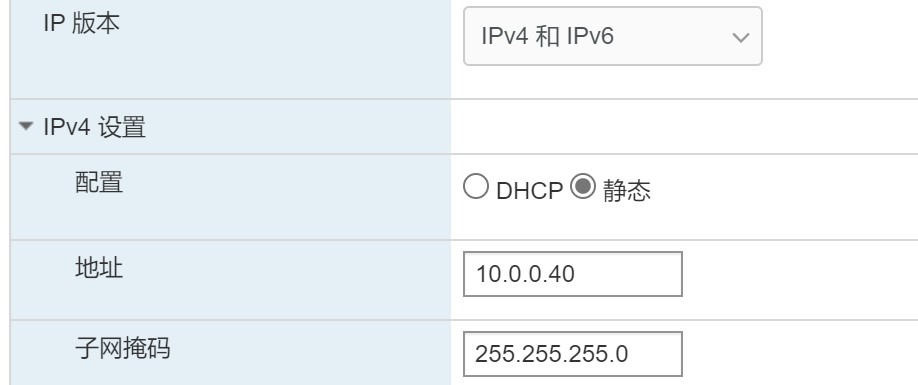
ip地址的设置为:
windows网络设置
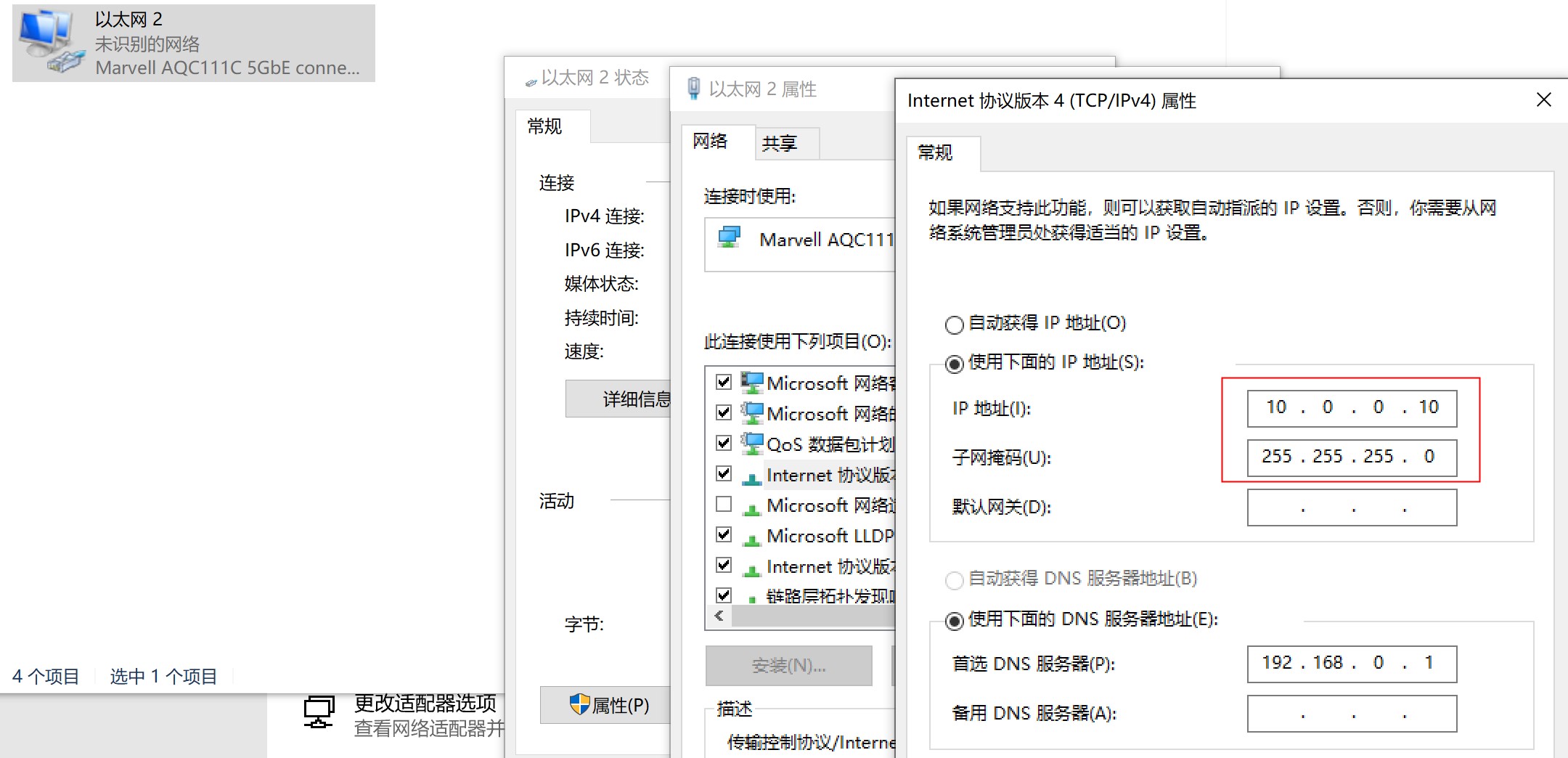
5G网络设置
5g网卡的适配器设置如下:
测试
esxi7作为服务器端
测试千兆网络
服务器端 esxi ip地址为 192.168.0.40:
 /usr/lib/vmware/vsan/bin/iperf3.copy -s -B 192.168.0.40
-----------------------------------------------------------
Server listening on 5201
-----------------------------------------------------------
客户端为windows10,启动iperf3.exe,走千兆网络,带宽接近千兆的:
iperf3.exe -n 1000M -c 192.168.0.40
Connecting to host 192.168.0.40, port 5201
[  4] local 192.168.0.10 port 65066 connected to 192.168.0.40 port 5201
[ ID] Interval           Transfer     Bandwidth
[  4]   0.00-1.00   sec   110 MBytes   923 Mbits/sec
[  4]   1.00-2.00   sec   110 MBytes   921 Mbits/sec
[  4]   2.00-3.00   sec   109 MBytes   917 Mbits/sec
[  4]   3.00-4.00   sec   110 MBytes   918 Mbits/sec
[  4]   4.00-5.00   sec   109 MBytes   918 Mbits/sec
[  4]   5.00-6.00   sec   110 MBytes   919 Mbits/sec
[  4]   6.00-7.00   sec   108 MBytes   902 Mbits/sec
[  4]   7.00-8.00   sec   109 MBytes   918 Mbits/sec
[  4]   8.00-9.00   sec   110 MBytes   918 Mbits/sec
[  4]   9.00-9.15   sec  16.0 MBytes   910 Mbits/sec
- - - - - - - - - - - - - - - - - - - - - - - - -
[ ID] Interval           Transfer     Bandwidth
[  4]   0.00-9.15   sec  1000 MBytes   917 Mbits/sec                  sender
[  4]   0.00-9.15   sec  1000 MBytes   917 Mbits/sec                  receiver

iperf Done.
测试五千兆网络
服务器端 esxi ip地址为 10.0.0.40:
 /usr/lib/vmware/vsan/bin/iperf3.copy -s -B 10.0.0.40
-----------------------------------------------------------
Server listening on 5201
-----------------------------------------------------------
客户端为windows10,启动iperf3.exe,走五千兆直连网络,单线程带宽只有2g多一点:
iperf3.exe -n 5000M -c 10.0.0.40
Connecting to host 10.0.0.40, port 5201
[  4] local 10.0.0.10 port 63397 connected to 10.0.0.40 port 5201
[ ID] Interval           Transfer     Bandwidth
[  4]   0.00-1.00   sec   244 MBytes  2.05 Gbits/sec
[  4]   1.00-2.00   sec   251 MBytes  2.11 Gbits/sec
[  4]   2.00-3.00   sec   254 MBytes  2.13 Gbits/sec
[  4]   3.00-4.00   sec   251 MBytes  2.11 Gbits/sec
[  4]   4.00-5.00   sec   263 MBytes  2.20 Gbits/sec
[  4]   5.00-6.00   sec   257 MBytes  2.15 Gbits/sec
[  4]   6.00-7.00   sec   259 MBytes  2.17 Gbits/sec
[  4]   7.00-8.00   sec   263 MBytes  2.20 Gbits/sec
[  4]   8.00-9.00   sec   273 MBytes  2.29 Gbits/sec
[  4]   9.00-10.00  sec   265 MBytes  2.23 Gbits/sec
[  4]  10.00-11.00  sec   266 MBytes  2.23 Gbits/sec
[  4]  11.00-12.01  sec   252 MBytes  2.10 Gbits/sec
[  4]  12.01-13.00  sec   262 MBytes  2.22 Gbits/sec
[  4]  13.00-14.00  sec   273 MBytes  2.29 Gbits/sec
[  4]  14.00-15.00  sec   264 MBytes  2.21 Gbits/sec
[  4]  15.00-16.00  sec   268 MBytes  2.25 Gbits/sec
[  4]  16.00-17.00  sec   262 MBytes  2.20 Gbits/sec
[  4]  17.00-18.00  sec   261 MBytes  2.19 Gbits/sec
[  4]  18.00-19.00  sec   260 MBytes  2.18 Gbits/sec
[  4]  19.00-19.19  sec  52.1 MBytes  2.27 Gbits/sec
- - - - - - - - - - - - - - - - - - - - - - - - -
[ ID] Interval           Transfer     Bandwidth
[  4]   0.00-19.19  sec  4.88 GBytes  2.19 Gbits/sec                  sender
[  4]   0.00-19.19  sec  4.88 GBytes  2.19 Gbits/sec                  receiver

iperf Done.
通过 -P 参数指定多线程,可以使用更大的带宽,实测下来:
- 单线程带宽2.2g
- 两个线程带宽3.5g
- 三个线程带宽3.3g
- 四个线程带宽4.7g
- 再往上加线程带宽还是4.7g
iperf3.exe -c 10.0.0.40 -t 20 -P 5
Connecting to host 10.0.0.40, port 5201
[  4] local 10.0.0.10 port 54228 connected to 10.0.0.40 port 5201
[  6] local 10.0.0.10 port 54230 connected to 10.0.0.40 port 5201
[  8] local 10.0.0.10 port 54231 connected to 10.0.0.40 port 5201
[ 10] local 10.0.0.10 port 54232 connected to 10.0.0.40 port 5201
[ 12] local 10.0.0.10 port 54233 connected to 10.0.0.40 port 5201
[ ID] Interval           Transfer     Bandwidth
[  4]   0.00-1.00   sec   106 MBytes   891 Mbits/sec
[  6]   0.00-1.00   sec   106 MBytes   890 Mbits/sec
[  8]   0.00-1.00   sec   106 MBytes   886 Mbits/sec
[ 10]   0.00-1.00   sec   125 MBytes  1.05 Gbits/sec
[ 12]   0.00-1.00   sec   123 MBytes  1.03 Gbits/sec
[SUM]   0.00-1.00   sec   567 MBytes  4.75 Gbits/sec
......
[ ID] Interval           Transfer     Bandwidth
[  4]   0.00-8.58   sec   921 MBytes   900 Mbits/sec                  sender
[  4]   0.00-8.58   sec  0.00 Bytes  0.00 bits/sec                  receiver
[  6]   0.00-8.58   sec   918 MBytes   897 Mbits/sec                  sender
[  6]   0.00-8.58   sec  0.00 Bytes  0.00 bits/sec                  receiver
[  8]   0.00-8.58   sec   912 MBytes   891 Mbits/sec                  sender
[  8]   0.00-8.58   sec  0.00 Bytes  0.00 bits/sec                  receiver
[ 10]   0.00-8.58   sec  1.04 GBytes  1.04 Gbits/sec                  sender
[ 10]   0.00-8.58   sec  0.00 Bytes  0.00 bits/sec                  receiver
[ 12]   0.00-8.58   sec  1023 MBytes   999 Mbits/sec                  sender
[ 12]   0.00-8.58   sec  0.00 Bytes  0.00 bits/sec                  receiver
[SUM]   0.00-8.58   sec  4.73 GBytes  4.73 Gbits/sec                  sender
[SUM]   0.00-8.58   sec  0.00 Bytes  0.00 bits/sec                  receiver
iperf3: interrupt - the client has terminated
参考: